

Try it for free
Create your e-commerce website’s telephone welcome message using AI-generated voice in just a few seconds
Create your account for free
You will be able to download this message and discover all the features in your Voconix space
Create my Voconix account
You have exceeded the 20-word limit for this test. Create a Voconix account to send messages of up to 100 words each.
Discover all our offersWhat your telephone reception service covers
4 scenarios for dealing with telephone enquiries specific in the shop
A customer who calls your shop usually wants an answer before coming in or to follow up on their visit. These four situations call for a precise and responsive telephone service.
A customer wants to know whether a product is in stock
Before coming into the shop, many customers ring to check that an item is in stock. Your reception staff should direct them to the correct department or an available sales assistant so they can get a quick answer.
The shop is closed for stock-taking or restocking
Occasional closures, annual stock-take, delivery day: these one-off closures must be clearly publicised to avoid customers making unnecessary journeys.
Large crowds during the sales or at peak times
Black Friday, sales, the festive season: the volume of calls often exceeds the in-store team’s capacity to handle them. An informative on-hold message helps prevent call abandonment.
A customer wishes to make a return or a customer service complaint
Faulty product, wrong size, dissatisfaction: the returns procedure must be clear, especially if it differs between in-store and online purchases.
Briefing, registration, delivery, installation. Several days’ wait and a charge for each change.
You can create the audio file in a matter of seconds. Your installer receives it straight away.
Set up your company’s telephone greeting shop
With Voconix, you can go from a blank page to a professional audio file in just a few clicks, without a studio or a technician.
Write your text
Custom text or pre-written template for a shop. Opening hours, stock, after-sales service, current promotions.
Choose your voice
Choose from 5 languages, with AI voices you can test on your text and human voices available.
Add some music
Over 10,000 tracks. Automatic mixing.
Instant download
File compatible with all systems. Ready to be sent.
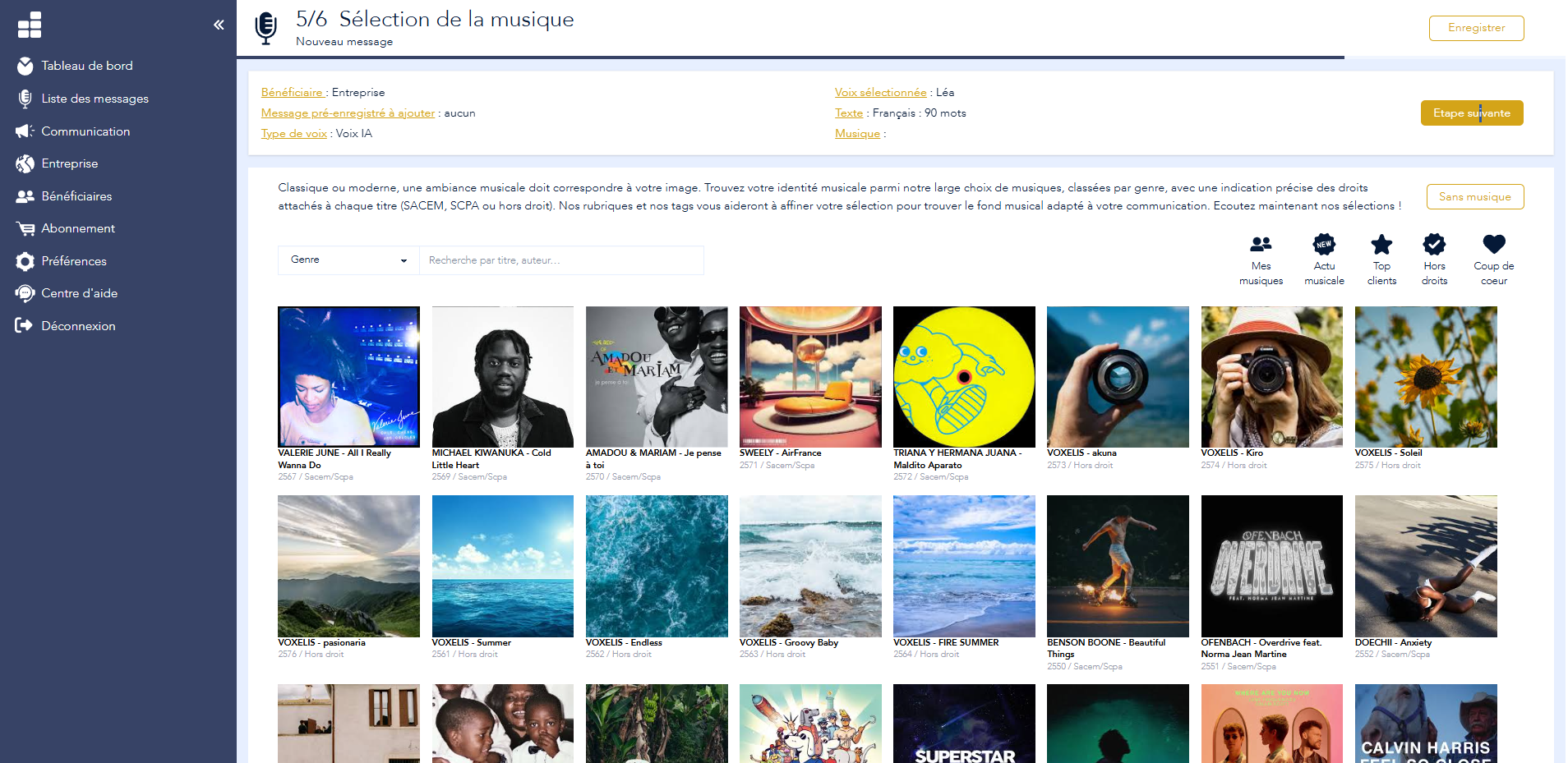
Step 5/6: Choose music from over 10,000 tracks
Audio files ready to be submitted on your switchboard
The files generated by Voconix are compatible with all telephone systems used in shops and retail outlets, without the need for any conversion.
Audio formats
MP3, WAV, G.711a, G.711u, G.722, G.729. Compatible with all IPBX systems and shop telephone systems. Standardised sound level.
Direct delivery
Enter your installer’s contact details in Voconix. Your file is sent automatically, without you having to do anything.
Saved pronunciations
Brand names, product codes: once entered in Voconix, the correct pronunciation is saved and reused in all your future messages.
A customer who calls wants an answer before making the journey
Many customers ring a shop to avoid making a wasted trip: to check stock levels, confirm opening hours, or make sure a product is available before they visit. If no one answers, the customer either goes along without knowing what to expect or turns to an online competitor.
A clear welcome message that sets out opening hours, directs customers to the right section and reassures them about stock availability reduces unnecessary journeys and dissatisfaction. With Voconix, this message can be created in a matter of seconds.
The specific aspects of handling telephone enquiries in-store
Managing peaks in visitor numbers
Sales, Black Friday, the festive season: these periods generate a volume of calls that the in-store team cannot always cope with whilst also attending to customers in-store. An informative on-hold message (extended opening hours, current promotions) helps to minimise callers’ frustration.
Directing customers to the right department or sales assistant
A shop organised into departments would be better off directing callers straight to the right person rather than leaving them on a general waiting line to enquire about product availability.
The difference between online shopping and in-store shopping
If your brand also has an e-commerce site, the welcome message should make it clear that returns and enquiries regarding in-store purchases are handled differently from online orders, to avoid directing customers to the wrong department.
Continuity outside opening hours
Even when closed, your shop can publicise its opening hours and current offers, and direct customers to the website via an IVS or a simple answering machine, so as not to miss out on a sales opportunity.
Practical advice
Best practice in customer reception in-store telephone service
Six practical tips for handling shop enquiries over the phone to reduce unnecessary trips and streamline after-sales service.
Please exercise caution when indicating product availability
Without confirming exact stock levels (which vary in real time), please direct customers to a member of staff or the relevant department for a reliable answer.
Update the message for each exceptional closure
Stock-taking, public holidays, building works: customers must be notified of these closures before they arrive; they should not find out about them when they get there.
Adapt the message during busy periods
During the sales or on Black Friday, mention the extended opening hours and current offers to turn the wait into useful information.
Distinguish between in-store after-sales service and online after-sales service
If your business also sells online, make it clear which channel handles which type of enquiry to avoid unnecessary transfers.
Direct customers to the right section or sales assistant
A message asking customers to select a department (fashion, technical, gardening) speeds up the handling of their enquiry and avoids multiple call transfers.
An energetic, commercial voice
Unlike a regulated sector, the tone can be warmer and more sales-oriented, much like the welcome you’d receive in a shop.
Telephone reception by sector
Every sector has its own constraints. Select your sector.
Enhance the voice communication on your shop
Pre-dismantling of the shop
The first message customers hear before being put through. Give your customers a warm welcome and let them know they’ll be attended to shortly.
Sales and special offers update
Black Friday, sales, the festive season: update your telephone greeting in a matter of seconds for each peak sales period.
Manage all your department messages
General welcome, after-sales service, specific departments, opening hours: create and coordinate all your shop’s messages from a single account.
Shop answering machine
Even when closed, you can provide information on opening hours, special offers and alternative contact details.
New department manager
Create the new manager’s message straight away, without having to wait for a recording studio.
Find your old messages
Old Black Friday posts, old promotions, old timetables: access the history of all your generated files.
IVR for shops
Guide your customers from the very first call: product availability, after-sales service, opening hours – without involving a sales assistant.
Customer service voicemail
Outside opening hours: ask your customers to leave a message, specifying a clear time for you to call them back.
The 100% standalone unit for your shop
Choose the voice, music and text, then create your own welcome message without having to rely on an external provider.
The right welcome message, at the right price
Commencez gratuitement. Passez à une formule pour les voix premium, plus de messages et le chargement direct sur votre mobile.
Découverte
Faites votre premier message.
1 message offert
Inclus
- Voix IA standard
- Jusqu'à 3 bénéficiaires
- 8 musiques au choix
- Fichier MP3
Essential
Pour les indépendants qui changent de message de temps en temps.
par an
Inclus
- Voix IA premium
- Tout le catalogue musical
- 10 bénéficiaires
- Attestation de droits
- MP3, WAV, Loi A, G7XX, OPUS, ZIP
- Recharges de messages et de chargements mobiles
Smart
Pour les équipes plus grandes qui changent souvent de message.
par an
Tout Essential, plus :
- Votre propre musique
- 10 messages IA au lieu de 3, et 3 chargements mobiles au lieu de 1
- 25 bénéficiaires, par exemple toute une équipe commerciale
Besoin de plus de messages ? Avec Essential ou Smart, ajoutez à tout moment 3 messages IA et 1 chargement mobile pour 45 € HT, ou 10 messages IA et 3 chargements mobiles pour 140 € HT.
Comparer toutes les formules
| Fonctionnalité | Découverte | Essential | Smart | PRO |
|---|---|---|---|---|
| Prix | Gratuit | 60 € HT par an | 144 € HT par an | 199 € HT par an |
| Messages IA inclus | 1 | 3 par an | 10 par an | 10 par an |
| Chargements mobiles inclus | 0 | 1 par an | 3 par an | 10 par an |
| Mots par message | 20 | 100 | 100 | 130 |
| Bénéficiaires | 3 | 10 | 25 | Illimités |
| Voix IA | Standard | Premium | Premium | Premium |
| Musique | 8 titres | Tout le catalogue | Catalogue + la vôtre | Catalogue + celle du client |
| Formats de fichier | MP3 | MP3, WAV, Loi A, G7XX, OPUS, ZIP | Comme Essential | Tous |
| Attestation de droits | — | Au nom du client | ||
| Recharges (HT) | — | 3 messages + 1 chargement : 45 € 10 messages + 3 chargements : 140 € | 3 messages + 1 chargement : 45 € 10 messages + 3 chargements : 140 € | Autant de chargements que de messages : 3 : 42 € · 10 : 120 € 20 : 210 € · 50 : 474 € |
| Email personnalisé à votre marque | — | — | — | |
| SAV réservé aux pros | — | — | — |
Start for free. Upgrade for premium voices, more messages and more beneficiaries.
Discovery
Create your first message.
1 free message
Included
- Standard AI voice
- 8 music tracks
- MP3 file
Essential
For sole traders who change their message now and then.
a year
Included
- Premium AI voices
- Full music catalogue
- Rights certificate
- MP3, WAV, A-law, G7XX, OPUS, ZIP
Smart
For larger teams that change their message often.
a year
Everything in Essential, plus:
- Your own music
- 10 AI messages instead of 3
- 25 beneficiaries instead of 10, e.g. a whole sales team
Compare all plans
| Feature | Discovery | Essential | Smart |
|---|---|---|---|
| Price | Free | €84 excl. VAT a year | €180 excl. VAT a year |
| AI messages included | 1 | 3 a year | 10 a year |
| Beneficiaries | 3 | 10 | 25 |
| Words per message | 30 | 100 | 100 |
| AI voices | Standard | Premium | Premium |
| Music | 8 tracks | Full catalogue | Catalogue + your own |
| File formats | MP3 | MP3, WAV, A-law, G7XX, OPUS, ZIP | Same as Essential |
| Rights certificate | — |
Starten Sie kostenlos. Wechseln Sie zu einem Tarif für Premium-Stimmen, mehr Ansagen und mehr Empfänger.
Basis
Erstellen Sie Ihre erste Ansage.
1 Ansage geschenkt
Inklusive
- Standard-KI-Stimme
- 8 Musiktitel
- MP3-Datei
Essential
Für Selbstständige, die ihre Ansage ab und zu ändern.
pro Jahr
Inklusive
- Premium-KI-Stimmen
- Gesamter Musikkatalog
- Rechtenachweis
- MP3, WAV, A-Law, G7XX, OPUS, ZIP
Premium
Für größere Teams, die ihre Ansage häufig ändern.
pro Jahr
Alles aus Essential, plus:
- Ihre eigene Musik
- 10 KI-Ansagen statt 3
- 25 Empfänger statt 10, zum Beispiel ein ganzes Vertriebsteam
Alle Tarife vergleichen
| Funktion | Basis | Essential | Premium | PRO |
|---|---|---|---|---|
| Preis | Kostenlos | 84 € zzgl. MwSt. pro Jahr | 180 € zzgl. MwSt. pro Jahr | 199 € zzgl. MwSt. pro Jahr |
| Inklusive KI-Ansagen | 1 | 3 pro Jahr | 10 pro Jahr | 10 pro Jahr |
| Empfänger | 3 | 10 | 25 | Unbegrenzt |
| Wörter pro Ansage | 50 | 100 | 100 | 130 |
| KI-Stimmen | Standard | Premium | Premium | Premium |
| Musik | 8 Titel | Gesamter Katalog | Katalog + Ihre eigene | Katalog + Musik des Kunden |
| Dateiformate | MP3 | MP3, WAV, A-Law, G7XX, OPUS, ZIP | Wie Essential | Alle |
| Rechtenachweis | — | Auf den Namen des Kunden | ||
| E-Mail in Ihrem Markenauftritt | — | — | — | |
| Support exklusiv für Profis | — | — | — |
Free
€84 /year
(10,000 titles)
€180 /year
Create my Voconix account
Choose a secure sign-in method: Google Workspace, Microsoft 365 Cloud or an email address with a password.
FAQ: Shop
Why does a shop need a professional telephone reception service?
A customer who calls a shop often wants to check some information before making the trip: product availability, opening hours or current promotions. Clear information provided over the phone prevents unnecessary trips and improves customer satisfaction.
Can we confirm the exact stock levels via an automated message?
No, stock levels change in real time, and an automated message should not give the caller a false sense of certainty. Instead, direct the caller to a sales assistant or the relevant department for a reliable answer at the time of the call.
How can you manage peaks in call volumes during the sales or on Black Friday?
A hold message that mentions extended opening hours and current promotions turns the wait into useful information and reduces callers’ frustration during busy periods.
Should a distinction be made between in-store after-sales service and online after-sales service?
Yes, if your business also sells online. Make it clear which channel handles which type of enquiry to avoid directing the customer to the wrong department and wasting time for both parties.
How do you announce a closure for stock-taking?
Create a specific message using https://voconix.fr/ that states the closure and reopening dates. Remember to reschedule your usual message once the stock-take is complete.
What sort of voice should you choose for a shop’s telephone greeting?
A dynamic and warm voice that reflects your brand’s commercial image. Unlike in regulated sectors, the tone can be more sales-oriented and approachable.
How do you direct a customer to the right department over the phone?
A message asking customers to select a department (fashion, technical, gardening, etc.) speeds up the process and avoids multiple call transfers within the shop.
Can an IVR system replace a sales assistant when answering product enquiries?
The IVR can direct callers to the correct department or provide general information on availability, but it should not replace a sales assistant when it comes to specific questions about a product or advice on making a purchase.
How do you set up a shop’s telephone greeting with Voconix?
Write your own text or use a ready-made template, choose a voice from 25 options, add music if required, then download the audio file, ready to send to your installer. All in under 2 minutes at https://voconix.fr/.
How much does it cost to set up a telephone reception service for a shop?
The first message is free, with no credit card required. Subsequent packages are tailored to the volume of messages you need to manage. See the prices at https://voconix.fr/#tarif.
