

Try it for free
Every employee deserves a voicemail in the image of your company. Create them all from a single space, with the same voice and the same tone.
Create your account for free
You will be able to download this message and discover all the features in your Voconix space
Create my Voconix account
You have exceeded the 20-word limit for this test. Create a Voconix account to send messages of up to 100 words each.
Discover all our offersCorporate voicemail: your company's blind spot brand image
Your website is polished. Your emails are professional. Your communication materials are impeccable. But what happens when a customer calls a member of staff directly and it goes to voicemail? In the vast majority of companies, the answer is disappointing: a message recorded in the corridor, a default message from the operator, or a message from the employee's arrival three years ago. Each voice mailbox is a direct point of contact with your customers and prospects.
What a neglected voicemail reflects
97% of small and medium-sized businesses have no professional greeting on their direct lines. Yet every employee's voicemail is a sound ambassador for your brand. Here's what your customers hear on untended lines:
A message recorded by the employee himself, with background noise and random diction.
The generic message from the operator: «The person you are calling is not at home». No identification, no personalisation.
An obsolete message mentioning an old job, an old number or a colleague who has left the company.
Total inconsistency between the voicemails of different team members.
With Voconix, In just a few minutes, you can create voice mailboxes for your entire team: the same voice, the same tone, the same background music. A consistent sound identity on each of your company's direct lines, with no studio, no delay and no technical dependency.
Each voice mailbox is a sound ambassador for your brand
A professional voicemail system that is consistent across all your team's lines is the image you deserve.
A controlled sound identity turns every missed call into an opportunity for reassurance. With Voconix, Forget about corridor noises or robotic synthesised voices by default. You can offer your callers a premium, uniform experience across 100% of your direct lines. Your brand instantly gains credibility, even when you don't pick up.
30
minutes
That's how long it takes to create voicemails for your entire team with Voconix. A voice chosen, a text written, a file downloaded.
25+
Voices
25 professional AI and human voices available. Create all your voicemails with the same voice for perfect sound consistency across all your company's lines.
10 000+
Music
Add professional background music to your voicemail to reinforce your sound identity. Over 10,000 royalty-free or commercial titles available.
5
Languages
Voconix offers the 5 major European languages for creating voicemails for your employees in the language of the person they are speaking to.
Compatible with your telephone system
Audio files generated by Voconix are compatible with all professional telephone systems on the market. As soon as it is generated, your voice mailbox can be downloaded in MP3 or WAV format and is ready to be placed on your switchboard, without any conversion or adjustment.
3CX : Connect to the webclient or the 3CX application. Go to Settings and then to Announcements. Import your MP3 or WAV file as a voicemail announcement. Each employee can manage their own outgoing message from their own interface.
Ringover : From your Ringover space, access your voicemail configuration. Import your MP3 file using the «Upload a file» option. The update is instantaneous on all the lines concerned.
Aircall : In your Aircall dashboard, go to number configuration. In the voicemail section, import your audio file. Recommended format: MP3 or 16-bit mono WAV.
Mitel, Alcatel, Avaya and standard PABX or IPBX : Send your file directly to your telephone installer via the automatic delivery integrated Voconix. They receive the file by email with integration instructions.
The Board Voconix : Create all your team's voicemail in a single session. In less than 30 minutes, all your staff's direct lines will display the same level of professionalism. The history of Voconix allows you to retrieve and re-download any voicemail at any time.
How to create voicemails for your team in just a few minutes?
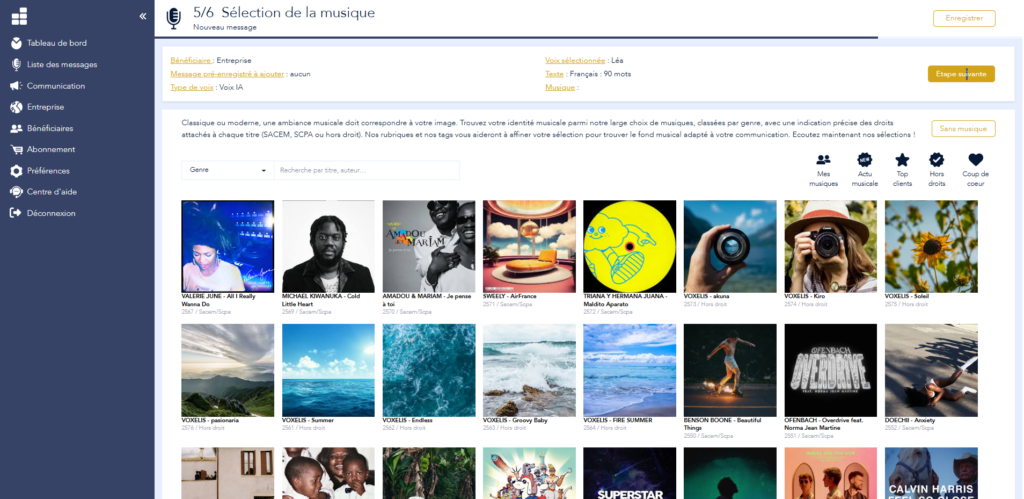
Your entire team in just a few minutes, no technical skills required
Voconix has been designed to create your fully autonomous professional voice mailboxes. New employee, departure, holiday, change of shift, exceptional closure: each announcement is generated with the voice and background music of your choice, in just a few seconds.
Create and manage all your company's voicemail in a single space. The file can be downloaded immediately or sent directly to your installer, in a format compatible with your switchboard.
Choice of voice
(5 languages, 25 voices, human and AI)
Copywriting
(+100 voicemail models)
Choice of music
(+10,000 tunes: optional background music)
Immediate download
(MP3 or WAV, in the format of your choice)
8 examples of voicemail by employee profile
Each employee profile has its own contacts and its own needs. Here are 8 examples of professional voicemail adapted to the most common corporate profiles. Customise the text and generate your audio file with Voconix.
Mailbox Field sales
«Hello, you've reached the voicemail of [First name Last name], a sales representative at [Company]. I'm probably out of town or at a customer meeting. Leave your message and I'll call you back as soon as possible. If you need me urgently, please text me on the same number.»
Mailbox Management
«Hello, you've reached the voicemail of [First name Last name], [Job title] from [Company]. I am currently unavailable. Please leave your name, contact details and the subject of your call. I'll get back to you as soon as possible.»
Mailbox Customer support
«Hello, you've reached the voice mailbox of the [Company] support department. To speed up the processing of your request, please include your contract or order number in your message. An advisor will contact you as soon as possible.»
Mailbox Assistant or secretary
«Hello, you've reached the voicemail of [First Name Last Name], assistant to [Department] at [Company]. I am currently unavailable. Please leave your message and contact details and I'll call you back as soon as possible.»
Mailbox Technician or speaker
«Hello, you've reached the voicemail of [First Name Last Name], a technician at [Company]. I'm probably out on a call. Please leave your number and the nature of your request, and I'll call you back as soon as I've finished.»
Mailbox HR Department
«Hello, you've reached the voicemail of [Company]»s human resources department. Please leave your name, number and the subject of your call. A member of our HR team will get back to you within 24 hours."
Mailbox Service direct line
«Hello, you've contacted the [Name] department at [Company]. We are unable to take your call at this time. Please leave a message with your contact details and the subject of your enquiry.»
Mailbox Professional mobile
«Hello, you've reached the mobile answering machine of [First name Last name], [Job title] at [Company]. I can't take your call at the moment. Please leave a message and I'll call you back as soon as possible. If it's an emergency, send me a text message.»
16 standard scripts professional voicemail
Are you lacking inspiration for writing your voicemail ? To save you time, we've compiled 16 free copy-and-paste text templates. Designed to be clear and commercially effective, these scripts cover all business situations. Simply customise the fields in square brackets and go straight to recording in the studio. Voconix.
Classic individual voicemail
«Hello, you've reached the voicemail of [First name Last name] from [Company]. I am currently unavailable. Please leave your name, number and the subject of your call and I'll get back to you as soon as possible.»
«Hello, this is [First name Last name], [Job title] at [Company]. I can't answer at the moment. Please leave your contact details and enquiry and I'll call you back within 24 hours.»
Technical tip: Voconix generates a native MP3/WAV audio file, directly compatible for import into Orange, SFR, Bouygues Telecom and Free Pro visual messaging systems.
Sales or customer relations manager
«Hello, you've reached the voicemail of [First name Last name], your sales contact at [Company]. I'm probably in a meeting. Leave your message and I'll call you back later today.»
«Hello, this is [First Name Last Name] from [Company]. I am travelling until [Date]. Please leave me a message. For a business emergency, please contact [Colleague] on [Number].»
Department or team
«Hello, you've reached the voicemail of the [Name] department of [Company]. Please leave your name, number and your request. An advisor will contact you as soon as possible.»
«Hello, you've contacted the [Name] department at [Company]. We are unable to take your call at this time. Please leave a message with your contact details and the subject of your call.»
Absence and leave
«Hello, you've reached the voicemail of [First name Last name]. I'm on leave until [Date]. Please leave a message and I'll call you back when I return. In my absence, please contact [Colleague] on [Number].»
«Hello, this is [First Name Last Name] from [Company]. I am currently on [maternity/parental] leave and will be returning on [Date]. My colleague [First Name] will be looking after my files at [Number].»
Out of hours
«Hello, you're calling outside our opening hours. Our teams are available from [Day] to [Day] from [Time] to [Time]. Leave your message and we'll call you back as soon as we're open.»
«Our offices are currently closed. So you don't have to wait, leave your message with your contact details and an advisor will call you back first thing on [Next Day].»
Closure or event
«Hello, [Company] is exceptionally closed until [Date]. Please leave your message and we will contact you as soon as we return. For any emergency, please write to [Email].»
«Hello, our teams are taking part in the [Name] trade fair from [Date] to [Date]. Leave us a message and we'll call you back as soon as we get back or meet us on our stand.»
Professional mobile
«Hello, you've reached the mobile answering machine of [First name Last name], [Job title] at [Company]. I can't take your call at the moment. Please leave a message and I'll call you back as soon as possible. If it's an emergency, send a text message.»
«Hello, this is [First Name Last Name] from [Company]. I'm out on a call. Please leave your number and the nature of your request and I'll call you back as soon as possible.»
Bilingual
«Hello, you've reached the voicemail of [First name Last name] from [Company]. Please leave your message in English or French. Hello, you've reached [Name] at [Company]. Please leave a message in French or English.»
«Welcome to [Company]. For assistance in French, please hold and leave your message. For English assistance, please hold and leave your message.»
Add music to your professional voicemail
Royalty-free titles:
No SACEM royalties, no administrative procedures. This music is included in your offer Voconix and can be legally integrated into your voicemail.
Commercial music :
For a strong sound identity with a well-known title. Voconix gives access to a huge commercial library. For titles subject to copyright, a ready-to-use SACEM form is available.
The 5 critical moments that require an update of your voicemail
An professional voicemail is not frozen in time. It's a dynamic communication tool. Here are the 5 most common flaws that affect your callers' experience, and that you can remedy in 30 seconds with Voconix :
1. Integrating a new recruit :
Don't leave your customers and prospects with an unconfigured messaging system or a default system message. A successful arrival requires a sound identity that is immediately operational to reassure your contacts that their new point of contact is professional.
2. Managing a «ghost line» (mobility or departure) :
An answering machine that still quotes the name of a former employee creates a breach of trust and a commercial stalemate. When a position is vacant or transferred, it is vital to redirect the caller without delay to the right department so that no opportunity is lost.
3. Prolonged silence (absences and holidays) :
The absence of information about a return date generates immediate frustration for the customer. It is essential that callers know when they will be contacted again, or which colleague to turn to for emergencies during their absence.
4. Exceptional events and closures :
Whether it's a trade fair, a stocktaking or a public holiday, informing your contacts in advance reduces the flow of unnecessary incoming calls and demonstrates proactive management of your customer relations.
5. The evolution of your opening cycles :
Broadcasting out-of-date opening times on a direct line encourages customers to try to reach you at the wrong times. Clarity about your actual availability is the first pillar of quality customer service.

To go further than voicemail
A business voicemail is not a message you create once and forget about. It evolves with your organisation. Voconix lets you manage all your company's voicemails from a single space.
Urgent message update
Is an employee going on leave, travelling or on training? Update their voicemail in 30 seconds from Voconix, without going back to your telephone installer.
Manage your sales operations
Make sure that all your staff have voicemails that are consistent with your editorial guidelines. Create or revise all the team's voicemails in a single session with Voconix.
Business Answering Machine
Even out of hours, every voicemail continues to speak for your company. Create an out-of-hours version for each direct line, with your opening hours and an alternative contact.
New employee voicemail setup
Has an employee left the company? Find their voicemail in the Voconix history and immediately create the voicemail of their replacement, keeping the same voice and style.
Find any past voicemail message
Instantly find any voicemail in the Voconix history. Redownload, modify or duplicate in just a few clicks without having to start from scratch.
IVR prompts and auto attendant
Prepare seasonal versions of your voicemail in advance: annual holidays, bridges, exceptional closures. Activate the right version at the right time from your history.
Mailbox
Each employee can have a different voicemail box depending on their status: available, in a meeting, away on business or on leave. Create all versions in advance from Voconix.
Stand-alone 100% to create your voice mailboxes
Write the text, choose the voice and background music, then generate your voicemail immediately. Download it or send it directly to your telephone installer via Voconix.
The pricing
Free
€84 /year
(10,000 titles)
€180 /year
Create my Voconix account
Choisissez un mode de connexion sécurisé parmi Google Workspace, Microsoft 365 Cloud ou une adresse email avec mot de passe.
The 5 main European languages
These different languages will enable you to create voicemails for your employees in the language of their international contacts. If you need another language, contact us
FAQ
Read our answers to the most frequently asked questions about creating professional voice mailboxes.
What is a voice mailbox?
An voicemail is a digital telephone messaging system that receives, records and stores audio messages left by your correspondents when you are unable to answer.
In a professional context, it is based on two inseparable elements:
The greeting (or answering machine message) : The audio file played to the caller to inform and reassure them.
Storage space : The interface (on a smartphone or virtual switchboard) enabling employees to consult their messages.
What text should you choose for your business voicemail?
A good message from voicemail contains: your first and last name, the name of your company and your job title, an indication that you cannot reply, an invitation to leave a message with contact details, and if possible an alternative contact. Voconix offers ready-to-use templates for every employee profile.
How do I create a professional voicemail box with Voconix?
To create a professional voice mailbox with Voconix, All you have to do is write your text, choose a voice from the 25 available and add optional background music. The audio file is generated in a few seconds and can be downloaded immediately in MP3 or WAV format.
How quickly can I create voicemails for my entire team?
Less than 30 minutes to create voicemails for an entire team of 10 people. Each individual voicemail takes less than 2 minutes to create and download. Voconix saves all your creations so you can find, modify and download them again at any time.
What's the difference between voicemail and a business answering machine?
La box voice refers to the system that receives and stores messages left by your callers when you don't pick up. The professional answering machine refers more specifically to the audio message that the caller hears before leaving a message. Voconix allows you to create this welcome message with a professional voice and background music, for every member of staff in your company.
How do I transfer my voicemail to 3CX, Ringover or Aircall?
On 3CX: import your file from Settings then Announcements in the webclient or application. On Ringover: from your voicemail configuration, import your MP3 via the upload option. On Aircall: in the dashboard, access the number configuration and import your file. For Mitel, Alcatel, Avaya and PABX or IPBX, use the automatic delivery of Voconix to send the file directly to your installer.
Can I create several versions of my voicemail depending on the status?
Yes. Voconix keeps a complete history of all your voicemails. Create several versions in advance (holidays, out of hours, events, travel) and download them again at the right time. There's no limit to the number of versions you can save.
Can I test Voconix for free before buying?
Yes. Voconix offers a free trial enabling you to create, listen to and download a complete professional voicemail box. No commitment or credit card required.
Can I retrieve and modify my voicemail boxes after they have been created?
Voconix keeps a complete history of all your creations. Find, modify and re-download any voicemail in just a few clicks, without having to start from scratch. Particularly useful for regular updates or organisational changes.
What audio formats are available for my voicemail?
Voice mailboxes generated by Voconix are available in MP3 and WAV, compatible with all telephone systems on the market: 3CX, Ringover, Aircall, Mitel, Alcatel, Avaya and all standard PABXs or IPBXs.
Can I add background music to my business voicemail?
Yes. Voconix includes a library of royalty-free music and a selection of commercial music. Mixing is automatic, with the voice always in the foreground.
Is royalty-free music really free of SACEM fees?
Yes. The royalty-free music available in Voconix can be used without SACEM or SCPA fees, included in your offer.
How can I standardise voicemail for all my employees?
From a single account Voconix, Choose the same voice and the same background music for all your employees. In just one session, create all your team's voice mailboxes with perfect sound consistency on each direct line.
What's the difference between AI voice and human voice for my voicemail?
The AI voice offers total flexibility: it can be changed at any time, and is consistent across all the voicemails in your team. The human voice provides an even more natural sound, particularly recommended for staff in direct customer contact. Both options are available and can be combined.
What text should you choose for your business voicemail?
A good voicemail message contains: your first and last name, the name of your company and your job title, an indication that you cannot answer, an invitation to leave a message with contact details, and if possible an alternative contact. Voconix offers ready-to-use templates for every employee profile.
Can my installer integrate the files directly into my standard?
Yes. Automatic delivery of Voconix sends the file directly to your telephone installer by secure email, with integration instructions. No technical handling on your part.
