

Try it for free
Create your medical practice’s telephone greeting using an AI voice in just a few seconds
Create your account for free
You will be able to download this message and discover all the features in your Voconix space
Create my Voconix account
You have exceeded the 20-word limit for this test. Create a Voconix account to send messages of up to 100 words each.
Discover all our offersWhat your telephone reception service covers
4 scenarios for dealing with telephone enquiries specific at the doctor's surgery
A doctor’s surgery is not like any other business. Here are four situations that require a specific approach to handling telephone enquiries, with information not covered by any generic template.
The office is closed or overwhelmed
Your telephone reception staff should reassure patients, explain how to book an appointment on Doctolib, and remind them to call 15 in the event of a life-threatening emergency.
The doctor is seeing patients
The patient must immediately understand why no one is answering and know exactly what to do, depending on the nature of their call.
The practice is closed for holidays, with a locum in charge
The contact details of the locum doctor must be included in the telephone message from the very first day of closure, without delay.
Timetables are subject to change from time to time
Training, on-call duty, exceptional closures: an outdated telephone helpline causes frustration and a loss of trust amongst your patients.
Briefing, registration, delivery, installation. Several days’ wait and a charge for each change.
You can create the audio file in a matter of seconds. Your installer receives it straight away and uploads it to your switchboard.
Set up your telephone greeting for doctor's surgery
With Voconix, you can go from a blank page to a professional audio file in just a few clicks, without a studio or a technician.
Write your text
Free-form text or pre-written medical template. Reference to ‘15’, Doctolib, opening hours.
Add some music
Over 10,000 tracks: commercial or SACEM royalty-free. Automatic mixing.
Download and upload
An MP3 or WAV file ready to be sent to your telephone installer, who will upload it to your switchboard. Or automatic upload from Voconix.
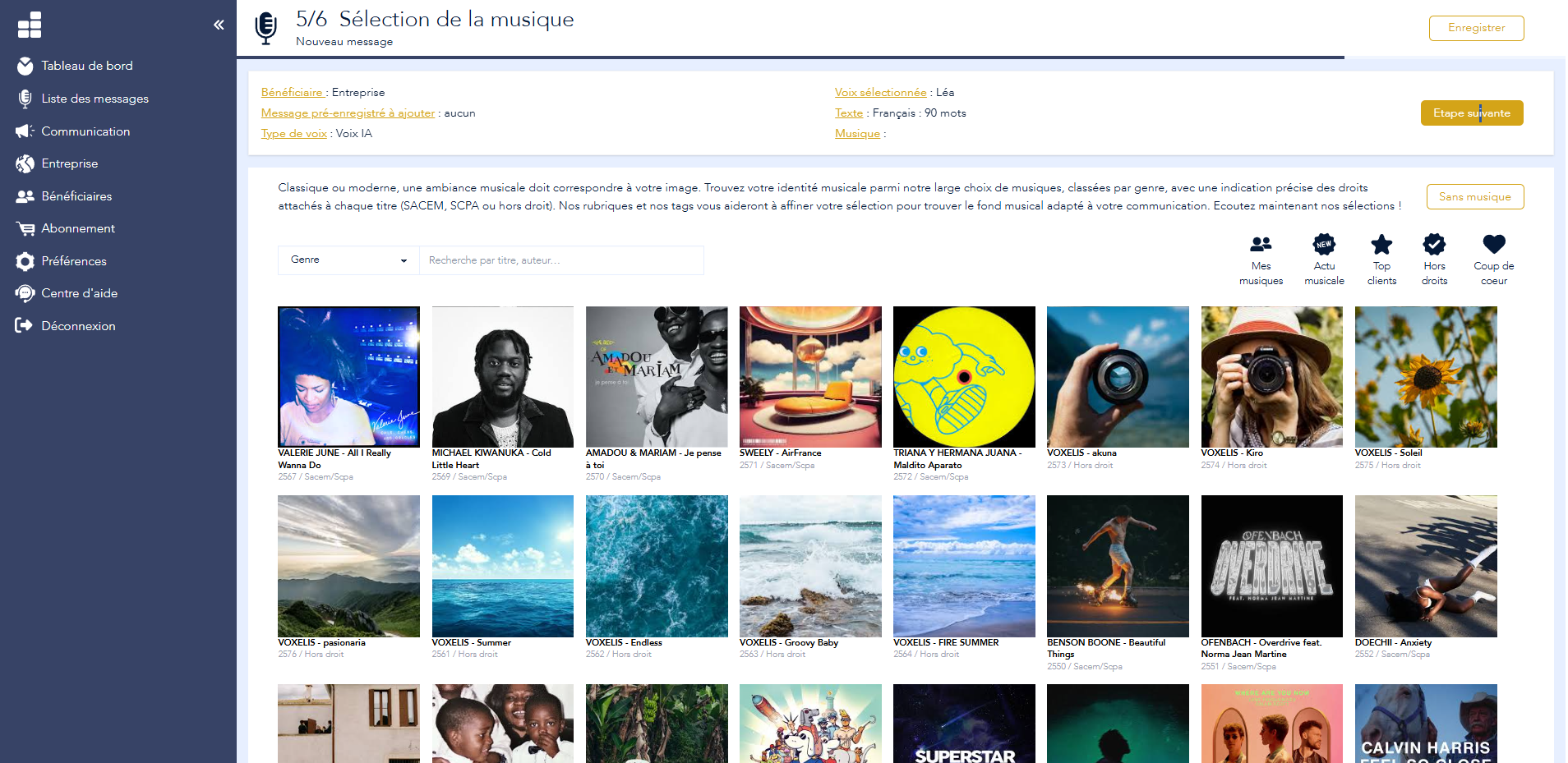
Step 5/6: Selecting music from a catalogue of 10,000 royalty-free tracks
Audio files ready to be submitted on your telephone system
The files generated by Voconix are produced in standard business telephony formats. They work without the need for conversion on all systems used in doctors’ surgeries.
Audio formats
MP3, WAV, G.711a, G.711u, G.722, G.729. Compatible with all IPBX and PABX systems on the market, including telephone systems used in doctors’ surgeries.
Sound level normalised for each file.
Direct delivery
Upload your file with a single click, or enter your telephone installer’s contact details in Voconix so that he automatically receives the file, ready to be uploaded to your switchboard.
Saved pronunciations
The name of a doctor, clinic or medicine that is difficult to pronounce is memorised once and for all. All your future messages will use the same pronunciation.
How your patients feel when they ring your practice
A patient who dials your practice’s number is never in a neutral state of mind. They may be worried about a test result, trying to reach their doctor urgently, or simply trying to reschedule an appointment. In any case, the first few seconds of your telephone greeting immediately determine the level of trust they place in your practice.
A well-crafted telephone greeting puts people at ease even before the call is answered. It shows that the practice is well-organised, that patients are welcome, and that emergencies are catered for. A generic or outdated message does exactly the opposite: it suggests disorganisation at the very moment when the patient needs reassurance.
This is why the telephone answering service at a doctor’s surgery is subject to rules that do not apply to standard corporate telephone answering services.
The responsibilities of a medical helpline
The reference to the 15th
Your message must include the SAMU number for any life-threatening emergency. This requirement must appear within the first few seconds, before opening hours, before Doctolib, and before any other information. A patient in distress must not have to wait until the end of your message to know what to do.
Guidance on booking appointments online
Redirecting patients to Doctolib or your booking platform automatically reduces the volume of repeat calls to your line. A patient who can book an appointment themselves at 11 pm won’t call back the next morning at 8.30 am. This feature is as much a tool for organisational efficiency as it is a service provided to the patient.
Information on on-call and duty arrangements
Outside your consultation hours, your telephone helpline must provide details of the on-call doctor for the area or the nearest on-call medical centre, including their telephone number. This information changes regularly and must be kept up to date. A message referring patients to a closed medical centre or an out-of-date number is worse than no message at all.
Six telephone greeting scripts for a doctor’s surgery
These templates cover the six most common situations in a doctor’s surgery. They can be used straight away on Voconix.
Reception open during office hours
Out of opening hours
Doctor seeing patients
Leave with a locum doctor
Exceptional closure
Summer on-call period
Create the audio file for your medical telephone greeting in a matter of seconds, without a recording studio and with no delay.
Your first message is completely free – no credit card required.
Practical advice
Best practice in customer reception medical telephone consultation
Six practical tips for a medical telephone reception service that inspires confidence and meets your patients’ needs.
Please keep your message to 25 seconds
State the name of the practice, explain why the line is busy, mention the 15 number for emergencies, suggest using Doctolib, and state how long the call will be held. If the call lasts longer than 25 seconds, an anxious patient may hang up before receiving the information they are looking for.
Make sure you pronounce the doctor’s name correctly
AI voices sometimes mispronounce proper nouns. On Voconix, you’ll learn the correct pronunciation of your name once and for all. It will be used automatically in all your future messages.
Check the audio format before sending it
Not all IPBXs support the same formats. Voconix generates the file in the exact format required by your telephone installer: MP3, WAV, G.711a, G.711u, G.722 or G.729. No further conversion is required.
Update your message whenever there is a change
Substitute staff, new opening hours, unscheduled closures, changes to the on-call number: an out-of-date telephone greeting provides incorrect information to every patient who calls. Every change at your practice warrants an immediate update.
Listen to your message before passing it on
What is clear in writing is not always clear when spoken. Listen to your entire message before sending it to your installer. Check the speed of delivery, the clarity of each piece of information and how well it blends with the music.
Please ensure the message remains confidential
Your telephone greeting must not contain any information that could identify patients or medical conditions. Avoid using medical specialisms that are too specific if they might reveal the reason for a patient’s call. A neutral, professional tone is recommended.
Telephone reception by sector
Every sector has its own constraints. Select your sector.
Enhance the voice communication on your doctor's surgery
Medical pre-discharge
The first sound your patients hear before being put through. Strike a reassuring and professional tone from the very first ring.
Urgent update
Last-minute cover, unscheduled closure, changes to on-call rota: update your telephone greeting straight away.
Manage all your medical messages
Practice reception, individual practitioners’ voicemail, on-call messages: all your voice communications centralised in Voconix.
Business Answering Machine
Even when closed, you can communicate (opening hours, contact points, etc.) without having to leave a message.
New practitioner at the practice
Create the new doctor’s telephone greeting straight away, using the same voice and tone as the rest of the practice.
Find your old messages
Change of locum, new associate doctor: find and reuse all your previous messages from the Voconix history.
IVR for a doctor’s surgery
Direct your patients to the right practitioner or department from the very first call, thanks to a voice menu tailored to your practice.
Medical voicemail
Whether you are in a consultation, on a training course or on leave: clearly state your call-back times and the options available to your patients.
100%: a standalone solution for your practice
Choose the voice, music and text, then create your medical telephone greeting straight away, without needing a recording studio.
The pricing
Free
€84 /year
(10,000 titles)
€180 /year
Create my Voconix account
Choisissez un mode de connexion sécurisé parmi Google Workspace, Microsoft 365 Cloud ou une adresse email avec mot de passe.
FAQ: Doctor's surgery
Take a look at our FAQs and find the answers to your questions
Why is the telephone reception service at a doctor’s surgery different from a standard telephone reception service?
A medical practice has specific obligations that no other sector shares. The reference to ‘15’ for life-threatening emergencies is an ethical obligation. Referring patients to Doctolib is a practice that reduces the administrative burden. Providing accurate information on on-call hours is a public health service. A generic message does not cover any of these three points.
What information must be included in a medical practice’s telephone greeting?
15 is the SAMU number for life-threatening emergencies. This information must appear at the start of the message, before the opening hours and before any alternative contact details. This is an ethical and professional obligation.
Can Doctolib be mentioned during a medical telephone consultation?
Yes, and it is strongly recommended. Encouraging patients to book appointments online reduces the pressure on your telephone line. Suggested wording: «To book an appointment, please visit our Doctolib portal, which is available 24 hours a day.»
How long should a medical practice’s telephone reception service be?
25 seconds maximum. The ideal sequence: identification of the practice, reason for unavailability, emergency number 15, Doctolib as an alternative, and the timeframe for a callback. Every extra second increases the risk that an anxious patient will hang up.
Should there be a different telephone reception service for out-of-hours medical cover?
Yes. Outside of your consultation hours, your message must state the name of the doctor on call or the local medical centre, along with their telephone number. With Voconix, it only takes a few seconds to create this message from your account.
How should a doctor’s replacement be announced on the telephone helpline?
Please specify the dates of closure, the name of the locum doctor and their direct line number. Example: «Dr [Surname] is on holiday from [date] to [date]. Dr [Locum] will be available for consultations on [number].» Generate this message in a matter of seconds on Voconix.
What sort of voice should be used for a medical practice’s telephone reception service?
A calm, gentle female voice. It should convey a sense of calm and competence without sounding aloof. Voconix offers 25 AI and human voices that you can try out directly on your text, with no obligation.
What sort of hold music should a doctor’s surgery use?
Light classical, solo piano or instrumental ambient. The rhythmic music creates a contrast with the medical setting. The catalogue Voconix includes playlists tailored to healthcare professions, which are SACEM royalty-free.
How does Voconix generate the final audio file?
You are writing your text on voconix.fr, choose a voice and some music, then generate the file with a single click. The file is produced immediately in MP3 and WAV formats, which are compatible with all telephone systems. You can send it to your installer, or they will receive it automatically via direct delivery Voconix.
How much does it cost to set up a telephone reception service for a medical practice with Voconix?
The first message is completely free on voconix.fr, without a credit card. Packages tailored to healthcare professionals are available from €5 (excl. VAT) per month. Find out more our prices for details of the packages.
