

Try it for free
Generate your professional voicemail with AI voice in just a few seconds
Create your account for free
You will be able to download this message and discover all the features in your Voconix space
Create my Voconix account
You have exceeded the 20-word limit for this test. Create a Voconix account to send messages of up to 100 words each.
Discover all our offersWhy have a professional voicemail?
When a client or prospect calls your company and reaches your answering machine, your voicemail is the first impression they get of you. A well-designed voicemail immediately reassures the caller, gives them a concrete alternative and strengthens your brand's credibility. A neglected voicemail pushes the caller towards a competitor without even leaving you a message.
What is professional voicemail?
An professional voicemail is the audio message played automatically when a caller reaches your answering machine: when you are away, on a call, out of hours or on holiday. This message replaces your presence and, in just a few seconds, confirms to the caller that they have reached the right person, explains your unavailability and tells them how else to reach you or when to call back.
Why take care of it? Because this message is often the first direct contact a customer or prospect has with you or a member of your team. It immediately conveys a level of credibility and seriousness. Studies on business telephony show that 80% of callers won't leave a message on a messaging system that is perceived as unprofessional. Conversely, a clear, well-structured message encourages the caller to leave a usable message, protects every business opportunity and builds trust in your brand, even when you're not there.
By mastering these codes, every missed call is an opportunity saved. This is where the quality of your professional voicemail becomes a direct lever for customer relations and brand image.
90% of business calls end up on a
voicemail
Every missed call is an opportunity to be protected, not lost.
Creating a professional voicemail no longer requires a studio, a large budget or lengthy delays. With Voconix, you write your text, add background music if you wish, and download your audio file in seconds in the format compatible with your phone system.
30
seconds
That's how long you'll need to create and download your professional voicemail with Voconix.
25+
Voices
Our professional voice cast works with Voconix for many years. Our AI voices are based on the latest generative technologies for a warm, natural sound.
10 000+
Music
Add background music or a jingle to your professional voicemail. Thousands of royalty-free and commercial songs available.
5
Languages
Voconix offers the 5 major European languages so you can create your voicemail in the language of your customers.
How to structure your professional voicemail in 5 steps
A well-structured voicemail is memorable, immediately understood and encourages the caller to leave a message. Here are the 5 essential steps of an effective professional voicemail :
Stage 1: Identification :
Start with your name, the name of your company and possibly your job title. The caller needs to know within the first few seconds that they have reached the right person. Without this confirmation, many callers hang up thinking they've dialled the wrong number. Example: «Hello, you have reached the answering machine of [First name Last name] from [Company name]».»
Step 2: The reason for unavailability :
Explain briefly why you cannot answer. One sentence will suffice. «I'm currently out of town», «our offices are closed», «I'm on holiday until [Date]». This information immediately reduces the caller's frustration.
Step 3: The invitation to leave a message :
Explicitly ask the caller to leave their name, number and the purpose of the call. The more specific your request, the more useful the messages you receive will be. For example, «Please specify your order number» or «Please indicate the best time to call you back» will speed up the process.
Step 4: The concrete alternative :
Never leave the caller without a solution. A contactable colleague, an email address, a specific call-back deadline. «I'll call you back as soon as possible» is not an alternative. «I'll call you back before 5pm» or «contact [Colleague] on [Number] for any emergency» are.
Stage 5: The thank you and the duration :
End with a short, warm thank-you. And stick to the absolute rule: 20 to 30 seconds maximum. Beyond that, the caller picks up before the beep and you lose the message.
How to change your voicemail?
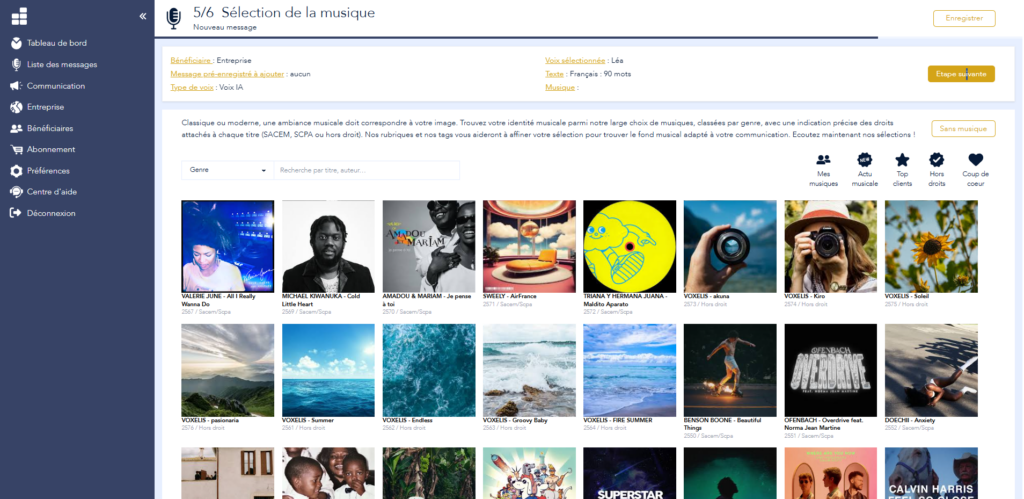
Your business voicemail ready in seconds
Voconix was designed to create your professional voicemail fully independently. Company message, individual employee voicemail, holiday message, exceptional closure, out of hours : every announcement is generated with the voice and tone you choose.
From a blank page to a professional audio file in any format, ready to drop off on your switchboard or business telephone. No studio, no delay, no technical constraints.
Choice of voice
(5 languages, 25 voices, human and AI)
Copywriting
(+100 voicemail templates)
Choice of music
(+10,000 tunes: optional background music)
Immediate download
(MP3, WAV, in the format of your choice)
8 examples of professional voicemail by situation
Need inspiration? Here are 8 examples of professional voicemail ready to use, tailored to the most common situations. Customize the text and generate your audio file in seconds with Voconix.
Voicemail standard company
«Hello, [Company name]. We are unable to answer your call at this time. Our offices are open Monday to Friday from [Time] to [Time]. Please leave your name, contact details and the subject of your enquiry: a member of our team will contact you as soon as possible.»
Voicemail individual employee
«Hello, you've reached [First name Last name] at [Company name]. I am currently unavailable. Please leave your name, number and the reason for your call and I'll call you back as soon as possible.»
Voicemail holidays and holidays
«Hello, you've reached [First name Last name]. I'm on leave until [Date]. Please leave a message and I'll call you back when I return. In my absence, you can contact [First name colleague] on [Number] for any emergencies.»
Voicemail exceptional closure
«Hello, you've reached [Company name]. Our establishment is exceptionally closed until [Date]. Please leave your message and we will contact you as soon as we return. For any emergency, please write to us at [Email].»
Voicemail outside opening hours
«Hello, you're calling outside our opening hours. Our teams are available from [Day] to [Day] from [Time] to [Time]. Please leave your name and number and we'll call you back as soon as we're open.»
Voicemail trade fair or event
«Hello, our teams are temporarily unavailable due to our presence at the [Name of show] in [City]. Please come and see us on our stand from [Date] to [Date] or leave a message and we'll call you back as soon as we get back.»
Voicemail business mobile phone
«Hello, you've reached [First name Last name], [Job title] at [Company]. I'm probably out of town or on a call. Leave me a message and I'll call you back as soon as possible. If it's an emergency, please text me on this number.»
Voicemail After-sales and customer service
«Hello, you've reached the [Company] after-sales service. To speed up the processing of your request, please include your order or contract number in your message. An advisor will get back to you as soon as possible. An advisor will contact you as soon as possible.»
20 template scripts for professional voicemail
An professional voicemail can be adapted to every situation. Here are 20 sample scripts to cover every situation, from company switchboards to exceptional absences. Adapt the brackets to your situation and generate your audio file in seconds.
Company standard
«Hello, [Company name]. We are unable to answer your call at this time. Please leave your name, contact details and the subject of your enquiry: a member of our team will contact you within 24 hours.»
«Hello, you've reached [Company name]. All our advisers are currently online. Please leave us a message and we'll get back to you as soon as possible. Thank you for calling.»
«Hello [Company name]. Our offices are open from [Day] to [Day] from [Time] to [Time]. Leave your message or visit our [Website] for more information.»
Professional individual messaging
«Hello, you've reached [First name Last name] from [Company]. I am currently unavailable. Please leave your name, number and the reason for your call and I'll call you back as soon as possible.»
«Hello, this is [First name Last name], [Job title] at [Company]. I can't answer at the moment. Please leave your contact details and the subject of your enquiry and I'll get back to you within 24 hours.»
Leave and holidays
«Hello, you've reached [Name]. I'm on leave until [Date]. Please leave a message and I'll call you back when I return. In my absence, you can contact [Colleague] on [Number].»
«Hello, this is [Name] from [Company]. I am currently on holiday and will be back on [Date]. For any emergencies, please contact [Colleague] on [Number] or write to [Email].»
«Hello, you've reached [Name]. I'm currently on [maternity/parental] leave and I'll be back on [Date]. My colleague [First name] is in charge of my files at [Number].»
Exceptional closure
«Hello, [Company name] is exceptionally closed until [Date]. Please leave your message and we will contact you as soon as we return. For any emergency, please write to us at [Email].»
«Hello, due to [Reason: annual holiday, bridge, inventory], our offices are closed from [Date] to [Date]. Please leave a message and we'll call you back when we return.»
Out of opening hours
«Hello, you're calling outside our opening hours. Our teams are available from [Day] to [Day] from [Time] to [Time]. Please leave your name and number and we'll call you back as soon as we're open.»
«Our offices are currently closed. So you don't have to wait, leave your message and an advisor will call you back first thing in the morning on [Next Day].»
Trade fair or event
«Hello, our teams are temporarily unavailable due to our presence at the [Name] exhibition in [City]. Please come and see us on our stand from [Date] to [Date], or leave a message for us to call you back when we return.»
«Hello, [First Name Last Name] is currently taking part in [Event]. He will contact you as soon as the event ends on [Date]. Please leave your message.»
After-sales and specialised services
«Hello, you've reached the [Company] after-sales service. To speed up processing, please include your order number in your message. We'll get back to you within 48 hours.»
«Hello, you've reached the [Name of department] of [Company]. Please leave your file number and the nature of your request. A dedicated advisor will call you back as soon as possible.»
Professional mobile voicemail
«Hello, you've reached [First name Last name], [Job title] at [Company]. I'm probably out of town or on a call. Please leave a message and I'll call you back as soon as possible.»
«Hello, this is [First Name Last Name] from [Company]. I can't answer at the moment. If it's an emergency, please text me on this number. Otherwise leave your message and I'll call you back shortly.»
Bilingual voicemail
«Hello, you've reached [Company name]. Please leave a message in English or French and we'll get back to you shortly. Hello, you've reached [Company name], please leave a message in French or English and we'll get back to you shortly.»
Add music to your professional voicemail
Adding background music or an intro jingle to your professional voicemail strengthens your sound identity and makes the listening experience more enjoyable. However, playing music on a professional answering machine is legally considered a "public communication", which engages the company's liability. Voconix offers you two options :
Royalty-free titles:
The simplest and most cost-effective solution. No PRS for Music declaration, no royalties. Your professional voicemail with professional background music, at no extra cost.
Commercial music :
You want a strong sound identity with a well-known track or a brand jingle? Voconix gives you access to a vast library of commercial music. For tracks subject to copyright, we provide you with a ready-to-use form for PRS for Music. All you need to do is submit it to finalise your declaration.
The 5 types of professional voicemail
A professional voicemail is not limited to a single message. Depending on your organisation and the situations you face, five types of messages should be planned to cover all scenarios :
1. Standard corporate messaging
The default message on your main line or switchboard. It is activated when all your staff are on the line or unavailable. It identifies the company, reassures the caller and tells them how to leave a message or when to call back.
2. Individual employee voicemail
Each employee's personal message on their work phone, whether fixed or mobile. It precisely identifies the person contacted and their company, and provides an alternative in the event of prolonged absence. This is often the first point of direct contact with a customer or prospect.
3. Absence and holiday messages
Activated during holidays, maternity or parental leave or long absences. It clearly indicates the date of return and redirects to a colleague available for emergencies. A well-written holiday message prevents any loss of business contact during the absence.
4. Exceptional closure message service
For long weekends, inventory closures, public holidays or unscheduled closures. It informs the caller of the situation, gives the resumption date and suggests an alternative by email if necessary.
5. Out-of-hours messaging
Broadcast automatically outside reception hours. It reminds you of opening times and invites you to call back or leave a message so that you can be contacted as soon as the office is open. This is the most frequently heard message of all in most companies.
Comparison
Voconix completes the range of traditional recording studios for companies that need day-to-day flexibility. To create or update your messaging system quickly and independently, Voconix is the solution.
|
🎙️
Register yourself |
🎚️
Studio classic |
Recommended ⚡ Voconix | |
|---|---|---|---|
| Creation time | Several tests | 24 to 48 hours | ★ Less than 2 minutes |
| Cost of creation | ★ Free | High | ★ 1st message free |
| Cost for each update | Re-register | High every time | ★ Included from €5/month |
| Autonomy | ★ Total | Studio outbuilding | ★ Total |
| Availability | ★ At any time | Working hours | ★ 24 hours a day, 7 days a week |
| Personalise your message | Low | ★ Very high | High |
| Sound quality | Variable | ★ Excellence | ★ Professional |
| Multilingual | No | On request | ★ 5 languages included |
| Installer delivery | Manuel | Manuel | ★ Automatic |
| Music library | No | Limited catalogue | ★ +10,000 royalty-free and commercial titles |
| Mixing vocals and music | No | ★ Manual by a sound engineer | ★ Automatic (ducking and normalisation) |
★ = best option for this criterion
★ = best option for this criterion
Audio files ready to upload to your system
The audio files generated by Voconix are produced in the standard formats of professional telephony. They are immediately ready to use on your landline, professional mobile or company phone system, without any technical manipulation.

Available formats :
-
Audio formats : MP3, WAV, G.711a, G.711u, G.722, G.723, Opus. Compatible with all telephone systems on the market.
Standard noise level : Each file is standardised to avoid problems of low volume or saturation on your lines.
Direct delivery :
- Download now: Once generated, your file is available in MP3 or WAV. Download it in one click and place it directly on your phone or switchboard.
- Automatic transmission to your installer : If you use a telephone integrator, enter their contact details and they will receive your audio files directly, ready to be placed on your switchboard.
- Memorising pronunciation : Your brand, proper names and references are memorised for consistent pronunciation across all your voicemails.
Complete your phone greeting
Your professional voicemail is just one element of your phone greeting strategy. Voconix allows you to create and manage all your phone announcements from a single platform.
Pre-hook
To let your callers know that they are indeed in contact with your company, create your telephone greeting with Voconix.
Urgent message update
Change of colleague, moving house, new working hours: an out-of-date voicemail system is detrimental to your image. Update all your voicemails in less than 30 seconds with Voconix.
Manage your sales operations
Make sure that every member of your staff has a professional voicemail system that is consistent with your editorial guidelines. Voconix lets you create all your team's voicemails from a single space.
Business Answering Machine
Even when closed, you can inform and reassure your callers: resumption times, alternative contact point, seasonal message. Voconix lets you create the right message for every situation.
New employee voicemail setup
Create a new employee's voicemail immediately, using the same voice and tone as the rest of the team. Guaranteed consistency across all company lines.
What messages did we get last year?
Has an employee left the company? Find and modify their voicemail in just a few seconds in the Voconix history, without having to start from scratch.
IVR prompts and auto attendant
Keep all your business voicemails up to date with Voconix. Standard, individual, out-of-hours: each announcement can be changed in a matter of seconds.
Voice box
Clearly indicate who to contact in the event of absence. In just a few seconds, Voconix lets you create a replacement mailbox with the contact details of the available colleague.
100% stand-alone voicemail system
Write your text, choose your voice and immediately generate your professional voicemail with Voconix. Share your creation with your team for validation before downloading.
The pricing
Free
€84 /year
(10,000 titles)
€180 /year
Create my Voconix account
Choisissez un mode de connexion sécurisé parmi Google Workspace, Microsoft 365 Cloud ou une adresse email avec mot de passe.
The 5 main European languages
These different languages will allow you to create your professional voicemail in the language of your international customers. If you need another language, contact us
FAQ
Read our answers to the most frequently asked questions about setting up a professional voicemail service.
How do you create a professional voicemail service using AI?
To create a professional voicemail with Voconix, simply write your text, choose a voice from the 25 available options (AI or human), then generate the audio file. You can optionally add background music. The file is immediately downloadable in MP3 or WAV format. No technical skills required.
How long does it take to set up a professional voicemail service?
Less than 2 minutes for a simple message. With Voconix, you write your text, select your voice and music, and the audio file is generated instantly. To create all the voicemails for an entire team of 10 people, allow less than 30 minutes from writing to downloading all the files.
What is the ideal length of a business voicemail?
The ideal length of a professional voicemail is 20 to 30 seconds maximum. Beyond that, the caller hangs up before the beep and you lose the message. The 5-step structure (identification, reason, invitation to leave a message, alternative, thank you) fits very well within this format when each sentence is targeted and without redundancy.
Can I create voicemails for my whole team from a single account?
Yes. From a single account Voconix, You can create as many business voicemails as you need: company switchboards, individual employee voicemails, holiday messages and exceptional closures. All can be accessed, modified and re-downloaded from your history.
How do I put my voicemail on my telephone or switchboard?
Once your voicemail has been generated, you can download the MP3 or WAV file and place it directly on your phone. You can also enter your telephone installer's contact details in Voconix for automatic delivery. No additional conversion is required.
Can I test Voconix for free before buying?
Yes. Voconix offers a free trial enabling you to create, listen to and download a complete professional voicemail service. No commitment or credit card required.
Can I retrieve and modify my voicemail messages after they have been created?
Voconix keeps a complete history of all your voicemail messages. You can retrieve, edit and re-download any message in just a few clicks, without having to start from scratch. Particularly useful for seasonal updates or organisational changes. Retention time depends on your subscription package.
What audio formats are available for my voicemail?
The voicemails generated by Voconix are available in MP3 (universal format, compatible with all mobile phones and phone systems) and in telephony WAV (format optimised for IPBX and PABX, compressed with G.711 and G.729 codecs). Each file is normalised for optimal sound quality.
Can I add music or a jingle to my professional voicemail?
Is royalty-free music really free of SACEM fees?
Yes. The royalty-free music available in Voconix can be used without PRS for Music or PPL fees. It is included in your plan and can be legally integrated into your professional voicemails, without any additional royalties.
What's the difference between AI voice and human voice for my voicemail?
The AI voice of Voconix offers total flexibility : modifiable at any time, consistent across all team voicemails, available in 5 languages. The human voice delivers an even more natural and warm result, particularly recommended for employee voicemails with direct customer contact. Both options are available and can be combined within the same company.
Can I set up a bilingual voicemail service?
Yes. Voconix offers the 5 major European languages : French, English, Spanish, German and Italian. You can create a bilingual voicemail by writing your text in both languages within a single message. Ideal for companies working with international customers.
What text should I choose for my business voicemail?
A good professional voicemail text follows the 5-step structure: identification, reason for unavailability, invitation to leave a message, concrete alternative, thank you. Voconix offers pre-written templates adapted to each situation (standard company, individual, holiday, closure, out-of-hours) to help you get started without a blank page.
Why not simply register yourself?
Self-recording can lead to practical problems: background noise, inadequate diction or volume, inconsistencies between the messages of different employees, difficulty in updating easily. With Voconix, Every professional voicemail system has a studio rendering that is consistent across all the company's lines, and can be modified at any time without having to re-record.
