

Try it for free
Generate your IVR messages with AI in a matter of seconds
Create your account for free
You will be able to download this message and discover all the features in your Voconix space
Create my Voconix account
You have exceeded the 20-word limit for this test. Create a Voconix account to send messages of up to 100 words each.
Discover all our offersWhy look after your IVR messages?
A IVR message (Interactive Voice Server) is much more than just an automated telephone menu: it's the first voice your callers hear. The quality of its audio files directly determines their experience, their patience and their decision to stay on the line or hang up. A well-designed IVR message directs every call to the right department in seconds, reduces the load on your switchboard and projects a professional image with every interaction.
What is an IVR message?
A IVR message refers to all the audio files that make up your Interactive Voice Server: the main greeting, the choice menus (press 1, press 2, etc.), the sub-menus, the saturation messages and the out-of-hours closing messages. These are the files that guide your callers through each stage of their call.
Optimise your IVR messages, means meeting three imperatives:
Orientation : Each message must guide the caller to the right service without ambiguity or frustration.
Clarity: Simple formulations, from the point of view of the caller, not the internal organisation.
Consistency: All IVR messages must sound the same, with a single voice and a uniform tone.
By mastering these codes, you're not just configuring a switchboard; you're building the first brand experience that your customers have every time they call. This is where the quality of your IVR messages is becoming a real lever for differentiation.
100% of your callers hear your
IVR message
Turn your switchboard into a customer relations tool, not an obstacle.
30
seconds
This is the time you will need to generate an IVR message and upload it to the creative studio Voconix.
25+
Voices
Our professional voice cast works with Voconix for many years, and our AI voices are based on the latest generative technologies.
10 000+
Music
Thousands of licensed commercial tracks updated weekly, plus a growing library of royalty-free music created by our AI, so you always find the right sound for your business.
5
Languages
Voconix offers the 5 major European languages: French, English, Spanish, German and Italian.
5 rules for writing your IVR messages
A IVR message effective can't be improvised. These five rules make the difference between a standard that guides and one that frustrates:
Above all, conciseness:
The caller wants to browse, not listen. The welcome message should not exceed 20 seconds and each menu option should be limited to one sentence. Beyond that, the abandonment rate increases even before the first choice is made. A simple rule: if you have to read it twice to understand it, it's too long.
Label the options according to the caller, not according to the flowchart:
«For the sales department, press 2» says nothing to the caller. «To track an order, press 2» is immediately understood. Each option must be formulated from the caller's point of view. What your organisation calls a service internally does not necessarily correspond to what your customer understands.
The tone: warm but direct:
An IVR message is not a welcome speech. The tone should be professional and welcoming without being chatty. Empty phrases such as «your call is very important to us» do nothing and make messages unnecessarily long. Every word must be justified.
Consistent sound across all messages:
An IVR contains several recorded messages. They all have to share the same voice, the same sound level and the same register. A different voice between the main menu and a sub-menu immediately breaks the credibility of your switchboard. That's why you need to Voconix generates all your messages from a single voice cast.
Regular updates :
An IVR message announcing a closed department, an employee who has left or obsolete working hours creates confusion and damages your image. Every change in internal organisation should trigger an update of the messages concerned. With Voconix, This update takes less than 30 seconds from your online space.
How to create your IVR messages with Voconix?
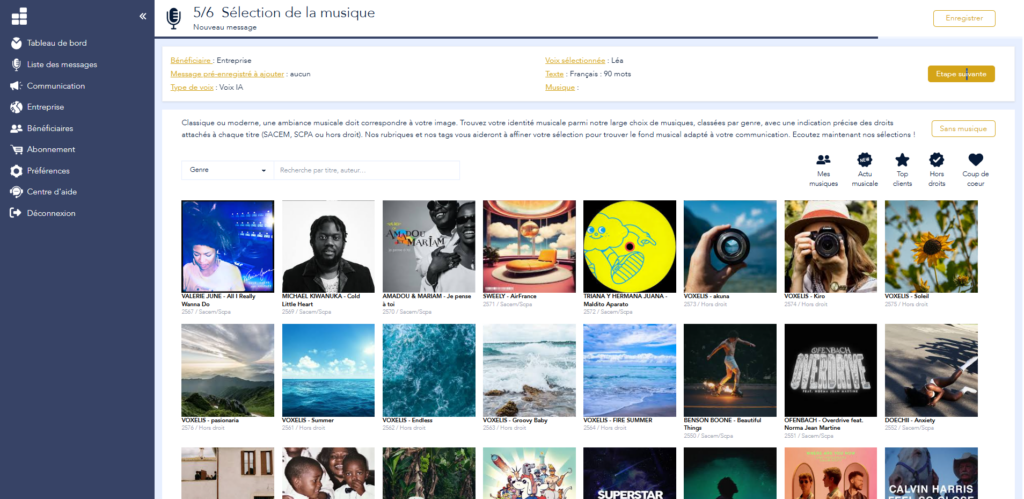
Your IVR audio files ready in seconds
Voconix has been designed to create all the audio files for your Autonomous IVR. Welcome message, choice menus, sub-menus, deterrence, closing: each announcement is generated with the voice and tone you choose.
From a blank page to a professional audio file in any format, ready for integration in any telephone system. It's the promise of a solution agile, without studio, without delay.
Choice of voice
(5 languages, 25 voices, human and AI)
Copywriting
(+100 models)
Choice of music
(+10,000 tracks: automatically mixed)
Immediate download
(In the format of your choice, with SACEM certificate)
8 examples of IVR messages by sector
Looking for inspiration? Discover 8 examples of IVR messages by sector of activity. Each example includes a welcome message and a choice menu. Adapt the text to your image and generate your audio files in seconds with Voconix.
IVR message for Town Hall
«Hello and welcome to the [Name of commune] Town Hall. For civil status and administrative documents, press 1. For town planning and planning permission, press 2. For social services and assistance, press 3. To contact the general reception, press 0 or stay on line.»
IVR message for Craftsmen
«Welcome to [Name of craftsman], craftsman [Trade]. To request a quotation, press 1. To follow up your current project, press 2. For an emergency, press 3 or stay on line and we'll get back to you as soon as possible.»
IVR message for Beauty Salon
«Welcome to [Salon name]. To make or change an appointment, press 1. To find out about our prices and services, press 2. For our offers and new products, press 3. To contact our team directly, press 0 or stay on line.»
IVR message for Interim Agency
«Welcome to Talent Direct, if you are a company and would like to entrust us with a recruitment assignment press 1, if you are a candidate and would like to register or update your file press 2, for any questions regarding your payslips or contracts press 3.»
IVR message for Healthcare practices
«Hello, you've reached the surgery of doctor [Name]. To make or cancel an appointment, press 1. To obtain test results, press 2. To contact the secretary's office, press 3. In the event of a life-threatening emergency, do not remain on the line and dial 15 immediately.»
IVR message for Law firms
«Welcome to [Name]. For business law, enter 1. For family law, enter 2. For employment and social law, press 3. To contact reception or for any other request, press 0 or stay on line.»
IVR message for Car dealership
«Welcome to your [Name/Make] dealer. For workshop and maintenance services, press 1. For the purchase of a new or used vehicle, press 2. For parts and accessories service, press 3. To reach reception, press 0 or stay on the line.»
IVR message for Hotel
«Welcome to [Hotel name]. For reservations, press 1. To contact reception, press 2. For restaurant and privatization, press 3. For concierge services, press 4. For all other requests, press 0 or stay on line.»
16 standard scripts IVR messages
A IVR message is built using precise formulas adapted to each type of announcement. Here are 16 typical scripts covering the key situations of any Interactive Voice Server.
Main welcome message
-
«Welcome to [Company name]. Please choose from the following options to be put through to the right service.»
-
«Hello and welcome to [Name]. To help you find your way around, please listen to the following options.»
Level 1 selection menu
-
«For sales, press 1. For customer service, press 2. For Accounts, press 3. To reach general reception, press 0 or stay on the line.»
-
«To make a new request, press 1. To follow up a current request, press 2. To speak to an advisor, stay on the line.»
Level 2 submenu
-
«You are in the sales department. For a quotation, press 1. For a current order, press 2. To return to the main menu, press star.»
-
«Customer service [Name]. For a complaint, press 1. For a return or exchange, press 2. To return to the previous menu, press star.»
Deterrent/occupation message
-
«All our lines are currently busy. Please call again in a few minutes. Thank you for your understanding.»
-
«The department you wish to contact is temporarily unavailable. You can contact us by email at [Email] or renew your call at a later date.»
Out of hours message
-
«You call us outside our opening hours. Our teams are available Monday to Friday from [Time] à [Time]. Leave us a message and we'll get back to you as soon as we get back.»
-
«Our offices are currently closed. We are opening on [Day] à [Time]. For any urgent request, please write to us at [Email]. »
Exit message / end of journey
-
«Thank you for calling [Company name]. To return to the main menu, press star. Have a nice day.»
-
«Your request has been processed. An advisor will contact you as soon as possible. Thank you for your confidence and see you soon.»
Automatic information message
-
«Our offices are open from Monday to Friday from [Time] à [Time]. For urgent requests, please visit our website [Website]. »
-
«To consult your documents and invoices online, go to your customer area [Website]. For all other enquiries, please stay on line.»
Multilingual message
-
«Welcome to [Name]. For assistance in French, press 1. For assistance in English, press 2. For assistance in Spanish, press 3.»
-
«To continue in English, press 2. Um auf Deutsch fortzufahren, drücken Sie die 3. »
Legal Guide Music & PRS Licensing
Would you like to add background music to your IVR message or your waiting messages between menu options? It's possible, and even recommended, to improve the listening experience. But playing music on a switchboard is legally considered as «communication to the public», which makes the company liable. Voconix offers you two options:
Royalty-free titles:
This is the cheapest and simplest solution. By choosing music in this category, you pay only no royalties to SACEM. Your IVR messages with no recurring broadcasting costs.
Hot tracks and commercial music
You want a strong sound identity with a current title or a well-known song? Voconix gives you access to a huge library of commercial music.
Administrative support : If you opt for a track subject to copyright, we provide you with a ready-to-use form for PRS for Music. All you need to do is submit it to finalise your declaration.
Top quality : All our tracks, whether royalty-free or commercial, are processed in the studio to guarantee crystal-clear sound on all telephone systems.
The 5 types of message from a IVR
An Interactive Voice Server is not just one message. It is made up of several types of announcement, each of which takes place at a specific point in the call. Here are the five types of IVR messages to be produced for a complete standard :
1. The main welcome message
This is the first message you hear as soon as you pick up the phone. It identifies the company and introduces the options available. It should not exceed 20 seconds.
2. The choice menu
This is the heart of the IVR: «For sales, press 1. For support, press 2...». Each option directs the caller to a service or triggers an action. Maximum 4 to 5 options per level.
3. Sub-menus
They refine the qualification of the request on a second level of depth. Example: once directed to the sales department, the caller chooses between a quote, an order or a complaint.
4. The message of deterrence
Broadcast when all lines are busy or a service is temporarily unavailable. It informs the caller and offers an alternative: call back, leave a message or contact by email.
5. The closing message
Broadcast outside opening hours or during exceptional closures. It informs you of opening times, suggests an alternative channel and invites you to call back.
Technical compatibility of your IVR audio files
The IVR messages generated by Voconix are produced to professional telephony audio standards. Each file is optimised for perfect playback on your system, whatever equipment you use.
Formats compatible with all systems:
- MP3 and WAV phone : The two standard formats for IP telephony. WAV is compressed with G.711 and G.729 codecs, directly compatible with IPBX, PABX, Centrex and cloud standards.
- Noise level standardisation : Each file is standardised to avoid problems of saturation or too low a volume on your telephone lines.
- Extended compatibility : 3CX, Aircall, RingOver, Mitel, NFON, Asterisk and all VoIP standards on the market.
Direct delivery to your installer:
Automatic delivery to your installer : Enter the details of your telephone integrator and they will automatically receive your IVR audio files, ready to be integrated into your switchboard.
Memorising pronunciation : Your brand, proper names and product references are memorised for consistent pronunciation across all your IVR messages.
Complete your telephone communication
Your IVR message is just one element of your audio greeting strategy. Voconix allows you to create and manage all your telephone advertisements from a single platform.
Pre-hook
Let your callers know straight away that they have reached the right number on your main line.
Urgent message update
Organisational change, new service, exceptional closure: an obsolete IVR message creates confusion every time you call. Voconix lets you update any announcement in less than 30 seconds.
Manage your sales operations
Make sure that all your employees have their voicemail updated with your current advertising spot? Then use the history to easily return to the corporate message.
Business Answering Machine
Even when closed, you can communicate (opening hours, contact points, etc.) without having to leave a message.
New employee voicemail setup
Set up a new team member's voicemail message straight away using your company's approved voice, music and script.
Which IVR did we have last year?
Has your IVR tree structure changed? Find all your messages immediately in the history of Voconix to modify or reuse them without starting from scratch.
IVR prompts and auto attendant
Keep your entire IVR tree regularly updated with Voconix. Menus, submenus, closing messages: each announcement can be modified in just a few seconds.
Voice box
Clearly indicate who to contact during your holidays or absences.
In your telephony application, customise the messages for each off-line status.
Stand-alone 100% for creating your IVR messages
Write your texts, choose your voice and immediately generate each message for your IVR with Voconix. Share your creations with your team for validation before downloading.
The pricing
Free
€84 /year
(10,000 titles)
€180 /year
Create my Voconix account
Choisissez un mode de connexion sécurisé parmi Google Workspace, Microsoft 365 Cloud ou une adresse email avec mot de passe.
The 5 main European languages
These different languages will enable you to create multilingual IVR messages to meet your international needs. If you need another language, contact us
FAQ
Browse the FAQs and find the answers to your questions about creating professional IVR messages.
How do you create an IVR message using AI?
To create an IVR message with AI, simply write the text for each announcement (welcome, menus, sub-menus, closing), choose a voice from the available options, then generate the audio files. Voconix produces each message separately in the format compatible with your standard. No technical skills are required.
How long does it take to generate an IVR message?
Each IVR message is generated in a matter of seconds. For a complete IVR with 5 to 8 announcements, allow less than 10 minutes from writing the text to downloading the audio files. Voconix treats each announcement independently, so you can update a single message without recreating the whole thing.
What are Voconix's strengths compared to other IVR message generators?
Voconix stands out for the quality of its synthetic and human voices, guaranteed compatibility with all IPBX and PABX systems, memory for difficult pronunciations, automatic delivery to the installer and a message history for updates. It's the only solution that combines AI and human voices for your IVR messages.
Are my IVR audio files compatible with my telephone system?
Yes, Voconix generates audio files in MP3 and WAV formats, compatible with all telephone systems: IPBX, PABX, cloud standards, 3CX, Aircall, RingOver, Mitel and Asterisk. WAV files are compressed using G.711 and G.729 codecs in line with IP telephony standards.
How do I send my IVR messages to my telephone installer?
Once your IVR messages have been generated, you can download them directly from Voconix or enter the details of your telephone installer for automatic delivery. The files are immediately ready to be integrated into your switchboard without any additional conversion.
Can I test the creation of IVR messages for free before buying?
Yes, Voconix offers a free trial that allows you to create, listen to and download a complete IVR message. No commitment or credit card required.
Can I find and modify my IVR messages after they have been created?
Voconix keeps a history of all the IVR messages created in your user space. You can retrieve, modify and re-download any announcement in just a few clicks, without having to recreate everything. The retention period depends on your subscription package.
What audio formats are available for my IVR files?
IVR messages generated by Voconix are available in MP3 and WAV. The WAV format is compressed to telephone quality to suit all systems: PABX, IPBX and Centrex.
Can I add background music to my IVR messages?
Voconix includes a library of royalty-free, AI-generated music that can be used as background music in your IVR messages or between menu options. This music can be used at no extra cost and without legal constraints.
Does Voconix offer royalty-free music with no PRS or PPL fees?
Yes, Voconix provides a selection of royalty-free music that can be used without SACEM or SCPA fees. This music is included in the offer and can be legally integrated into your IVR messages, without additional royalties.
How do I contact Voconix support if I need help?
Support Voconix can be contacted by email at support@voconix.com, via the platform's integrated chat facility, or by telephone during business hours. Requests are dealt with within 24 hours on weekdays, and priority assistance may be offered depending on the packages subscribed to.
Can I try Voconix with no commitment?
Yes, Voconix allows you to test its service free of charge with no obligation. The trial gives access to the full range of features, including the creation of IVR messages, so you can evaluate the solution before signing up to a paying package.
What text should I choose for my IVR messages?
A good IVR message script should be concise, formulated from the caller's point of view and consistent with the other levels of the tree. Voconix offers pre-written templates to help you structure each type of message according to your sector of activity.
Why use a professional voice for your IVR messages?
A studio voice instantly reinforces the credibility of your IVR message. The AI of Voconix offers perfect elocution and a consistent professional tone throughout your tree structure, from the welcome message to the sub-menus.
